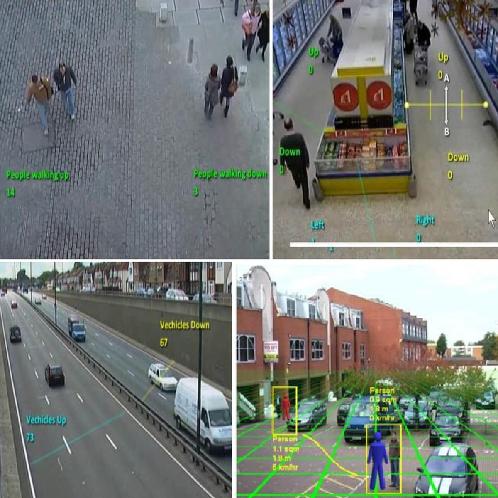

ITEM SPECIFICS
-
Brand
Unbranded
-
origin
Republic of Korea
-
Size(Capacity)
PRODUCT DESCRIPTION
Video Analytics – A New Standard
UDP’s embedded intelligent Video Analytics software is fast becoming the standard for all surveillance and security systems.
When combined with UDP’s comprehensive range of IP standard, Megapixel and HD cameras, IP encoders and compression cards Video Analytics provides the most comprehensive surveillance coverage to combat today’s increasing security risks.
The system adds real value to any CCTV installation in a simple and cost effective manner through use of its powerful intuitive tracking engine.
When combined with UDP’s comprehensive range of IP standard, Megapixel and HD cameras, IP encoders and compression cards Video Analytics provides the most comprehensive surveillance coverage to combat today’s increasing security risks.
The system adds real value to any CCTV installation in a simple and cost effective manner through use of its powerful intuitive tracking engine.
Benefits
The system offers the following overall benefits:
- High quality tracking engine
- High quality tracking engine
- Quick and easy to use – intuitive patented 3D graphical interface
- No algorithm parameters
- Cost-effectiveness
- No algorithm parameters
- Cost-effectiveness
Tracker
This high-end tracking engine, which is the basis of the system, offers a wide variety of intuitive, intelligent functions. When incorporated into the various applications, they enable one of the most sophisticated Video Analytics packages available:
- Tracks up to 100 targets simultaneously.
- Up to 40 general purpose, user-defined, polygonal detection zones
- Camera shake cancellation – tracker works even if the camera is on a swaying pole
- Tracks objects when they stop or move very slowly
- Continues to track objects which pass each other, ensuring that the trail is continuous and unbroken
- Continues tracking when objects are partially or completely obscured temporarily
- Adjusts to image degradation caused by rain, fog, dirty camera lens and low sun position causing dazzle
- Tracks up to 100 targets simultaneously.
- Up to 40 general purpose, user-defined, polygonal detection zones
- Camera shake cancellation – tracker works even if the camera is on a swaying pole
- Tracks objects when they stop or move very slowly
- Continues to track objects which pass each other, ensuring that the trail is continuous and unbroken
- Continues tracking when objects are partially or completely obscured temporarily
- Adjusts to image degradation caused by rain, fog, dirty camera lens and low sun position causing dazzle
- Ignores changes in light due to clouds and switching on artificial lights or camera auto-iris operation
- Ignores repetitive movement – waving trees, rippling water
- Ignores cloud shadows passing across the ground
- Ignores video interference and missing video x-frames
- Does not trigger false alarms from PTZ camera movement
- Tracks objects on 100% of screen area (except in any non-detection zones as defined by the user)
- Includes on-screen Annotation Metadata – draws drawing bounding boxes and object trails.
- Highlights alarmed and non-alarmed objects in different colors
- Ignores repetitive movement – waving trees, rippling water
- Ignores cloud shadows passing across the ground
- Ignores video interference and missing video x-frames
- Does not trigger false alarms from PTZ camera movement
- Tracks objects on 100% of screen area (except in any non-detection zones as defined by the user)
- Includes on-screen Annotation Metadata – draws drawing bounding boxes and object trails.
- Highlights alarmed and non-alarmed objects in different colors
System Overview
UDP’s Video Analytics package covers a range of CCTV platforms, including IP cameras, encoders and PC-based server solutions. It offers:
- Two levels of functionality: Primary, VCApresence – and more advanced analytics, VCAsurveillance
- Three platform-based packages: IP, PC, PC open
- Three specific applications:
- Three specific applications:
* Intrusion Detection, Perimeter surveillance and security
* Retail management intelligence and security
* Traffic and transport surveillance, management and security
* Retail management intelligence and security
* Traffic and transport surveillance, management and security
FUNCTIONALITY
- Primary intrusion detection:
* The Presence filter detects when an object, person or vehicle is inside or crossing a zone or a line
* Camera attack detection: detects moving, defocusing or covering of the camera
* Detection zones are polygonal with a variable number of vertices so that any shape can be supported
* Detection zone can also be a line, which can have one or many segments
* Includes non-detection zones for masking possible sources of false alarms
* Fast moving objects are detected even if they pass through the zone or line quickly
* Camera attack detection: detects moving, defocusing or covering of the camera
* Detection zones are polygonal with a variable number of vertices so that any shape can be supported
* Detection zone can also be a line, which can have one or many segments
* Includes non-detection zones for masking possible sources of false alarms
* Fast moving objects are detected even if they pass through the zone or line quickly
- Camera shake cancellation: tracker works even if the camera is on a swaying pole
- Tamper detection: alarm is triggered for cameras no longer providing effective coverage due to being obscured by a plastic bag, a spray painted lens or moved from its correct position
- Designed for IP & PC platforms
- Free of charge with most UDP products
- Tamper detection: alarm is triggered for cameras no longer providing effective coverage due to being obscured by a plastic bag, a spray painted lens or moved from its correct position
- Designed for IP & PC platforms
- Free of charge with most UDP products
(VCAsurveillance: The high-end VCAsurveillance package provides additional functionality and advanced intrusion detection, including a wide range of behavior filters and counting functions suitable for a many different CCTV analysis applications. Obtainable via license.)
Includes all features of VCApresence, plus:
Enter and Exit Detection
An “object entered” alarm is raised when an object crosses from the outside to the inside of a detection zone. Conversely, an “object exited” alarm is raised when an object crosses from the inside to the outside of a detection zone.
Stopping Detection
Objects that are stopped inside a zone for longer than the defined amount of time will trigger the rule and raise an alarm.
Dwell detection
Objects that dwell inside a zone for longer than the pre-defined amount of time will trigger the rule and raise an alarm.
Directional Detection
Objects that travel in the configured direction (within the limits of the acceptance angle) through a zone or over a line trigger the rule and raise an alarm.
Abandoned Object Detection
This detects the abandoning of an object in a pre-defined zone e. g. a bag or suitcase left on the street.
Removed Object Detection
Significant objects are detected when carried into the zone, trigger the rule and raise an alarm. E. g. a missing marked object such as a picture in a museum.
Tailgating Detection
Object tailgating is defined as two objects crossing a virtual line or zone within in a pre-defined time x-frame.
An “object entered” alarm is raised when an object crosses from the outside to the inside of a detection zone. Conversely, an “object exited” alarm is raised when an object crosses from the inside to the outside of a detection zone.
Stopping Detection
Objects that are stopped inside a zone for longer than the defined amount of time will trigger the rule and raise an alarm.
Dwell detection
Objects that dwell inside a zone for longer than the pre-defined amount of time will trigger the rule and raise an alarm.
Directional Detection
Objects that travel in the configured direction (within the limits of the acceptance angle) through a zone or over a line trigger the rule and raise an alarm.
Abandoned Object Detection
This detects the abandoning of an object in a pre-defined zone e. g. a bag or suitcase left on the street.
Removed Object Detection
Significant objects are detected when carried into the zone, trigger the rule and raise an alarm. E. g. a missing marked object such as a picture in a museum.
Tailgating Detection
Object tailgating is defined as two objects crossing a virtual line or zone within in a pre-defined time x-frame.
For example, a second unauthorized vehicle enters a parking lot close to a first vehicle that has access permission, or two people enter a security zone with a single access card.
Object Classification
VCAsys can perform object classification once the camera has been calibrated. Object classification is based on properties extracted from the object including object area and speed.
Objects Counting
Up to 40 on-screen counters linked to the detection rules, provide on-screen counting of all detection objects.
Object Classification
VCAsys can perform object classification once the camera has been calibrated. Object classification is based on properties extracted from the object including object area and speed.
Objects Counting
Up to 40 on-screen counters linked to the detection rules, provide on-screen counting of all detection objects.
(VCAcount: High-accuracy counting optimized for multiple objects (people and/or vehicles) in high density conditions.)
- Counting license can co-exist with any other VCA package, and it can be activated on top of VCApresence or VCAsurveillance
MAJOR BENEFITS
The web browser interface included in each of UDP’s IP devices provides complete access to all the features of the analytics package. Real-time on-screen annotation of the object tracking and segmentation bitmap (blobs) gives information about the operation of the VCA. All configuration and control is done by the HTTP API which provides comprehensive integration capabilities. An event can trigger digital output contact, email or API messages, detailing the bounding box, trail, rule, zone, time and event ID of alarms. Metadata is provided as an XML data stream.
- Advanced SDK package with worldwide support, provides comprehensive capability to integrate the VCA into any DVR/NVR or video management system (VMS)
- Unique, easy to use, patented 3D calibration suitable for overhead and side-viewing cameras – calibration in metric or imperial units
- On-screen display of object classification, speed, area and height
- Speed filter with upper and lower speed thresholds
- Filter on object class – for example people, group of people, vehicle, clutter, etc.
- Filter out small animals, birds and blowing trash by excluding objects in the clutter category
- Object classes can be changed by the user
- Combined filter using object class and one other filter
- Includes full forensic metadata stream in XML format for customer use
- Abandoned object and removed object detection
- Unique, easy to use, patented 3D calibration suitable for overhead and side-viewing cameras – calibration in metric or imperial units
- On-screen display of object classification, speed, area and height
- Speed filter with upper and lower speed thresholds
- Filter on object class – for example people, group of people, vehicle, clutter, etc.
- Filter out small animals, birds and blowing trash by excluding objects in the clutter category
- Object classes can be changed by the user
- Combined filter using object class and one other filter
- Includes full forensic metadata stream in XML format for customer use
- Abandoned object and removed object detection
PLATFORM BASED PACKAGES
UDP provides three options for delivering its video analytics: one edge based option and two server based options, providing the most effective way to integrate the software into your system.
- VCAsysIP : Embedded in “Edge” devices such as UDP’s NVC encoders and IPE network cameras
- VCAsysPC : Integrates with UDP’s range of NCP, ECP, ECPR, MP and HP series video capture cards
- VCAsysPCopen : Runs independently of PC hardware in the system and hence can be used with any type of PC or IP capture device from other manufacturers
ADDITIONAL FEATURES
- Camera shake cancelation : This feature stabilizes the image before video analytic analysis and provides a steady picture in an unstable environment. For example, a camera installed on a high pole at a road junction.
- Calibration configuration : A mimic’s ‘feet’ stay fixed to the screen position when the camera height, tilt and field of view (FOV) are changed (the mimic feet are fixed but the mimic’s height can change). This is helpful in calibrating the scene: the mimic remains steady alongside objects in the video image so that matching their height is easy as no further adjustment of the mimic’s position is necessary.
- Configuration interface makes it easier to use : Transparent grid/Ability to pan and roll grid controlled by slider/Ability to add extra mimics/Rendering of horizon
- Load and save VCA configuration : Enables the exporting and importing of the entire VCA configuration instead of only rules and zones.
- Megapixel support : The video analytics functionality is fully supported in all UDP’s megapixel camera offerings.
- Additional advanced VCA settings : Additional advanced settings include tracking options enabling a minimum tracked object size to be set. Objects smaller than the specified sizes are totally ignored by the tracking engine. Furthermore, the user can specify how long (in milliseconds) alarmed objects and track annotation are displayed.
ADDITIONAL APPLICATIONS
In addition to traditional Intrusion Detection, Perimeter Surveillance and Security application, VCAsurveillance covers the following extensive range of additional detection functions for specific applications:
Retail Management Intelligence and Security
- Flow analysis
- Counting
- Warehouse protection
- High theft item monitoring
- Stock monitoring
- Unauthorized access or walking in the wrong direction
- Fallen merchandise
- Blocked emergency exit
- Counting
- Warehouse protection
- High theft item monitoring
- Stock monitoring
- Unauthorized access or walking in the wrong direction
- Fallen merchandise
- Blocked emergency exit
Transport Management and Security
- Traffic flow analysis
- Vehicle counting
- Stabilize cameras on poles
- Vehicle stalled on shoulder
- Vehicle stopped in unauthorized location
- Driving in the wrong direction
- Speed limit warning
- Stopping in emergency zone
- Parking in illegal places (Bus stop, etc)
- Vehicle counting
- Stabilize cameras on poles
- Vehicle stalled on shoulder
- Vehicle stopped in unauthorized location
- Driving in the wrong direction
- Speed limit warning
- Stopping in emergency zone
- Parking in illegal places (Bus stop, etc)
Considerations when installing Video Analytics (VCA)
Choice of Analytics Product
There are many manufacturers of VCA systems, each with different strengths and weaknesses. Some
manufacturers offer systems targeted at specific situations such as intrusion detection, traffic
surveillance and so forth. Make sure you know what you want and if you have multiple specific scenarios
it might pay to use the different manufacturers for different applications. Look for manufacturers that
have some government or industry accreditation, e.g. i-LIDS from the UK home office.
There are many manufacturers of VCA systems, each with different strengths and weaknesses. Some
manufacturers offer systems targeted at specific situations such as intrusion detection, traffic
surveillance and so forth. Make sure you know what you want and if you have multiple specific scenarios
it might pay to use the different manufacturers for different applications. Look for manufacturers that
have some government or industry accreditation, e.g. i-LIDS from the UK home office.
Edge or Server Based?
Many new cameras and IP encoders are hitting the market with the ability to run the analytics inside the
camera. So-called “analytics at the edge”. In a large amount of cases, edge devices offer benefits over
server-based systems. Since edge devices run the analytics locally, they can be configured to send a
video clip only when alarms are detected, thus saving network bandwidth and costs. On the other hand,
server based analytics might be the right solution if you need to run video stored on your NVR through
analysis. One thing worth considering: you can make an edge device behave like a server system, but not
the other way around!
Many new cameras and IP encoders are hitting the market with the ability to run the analytics inside the
camera. So-called “analytics at the edge”. In a large amount of cases, edge devices offer benefits over
server-based systems. Since edge devices run the analytics locally, they can be configured to send a
video clip only when alarms are detected, thus saving network bandwidth and costs. On the other hand,
server based analytics might be the right solution if you need to run video stored on your NVR through
analysis. One thing worth considering: you can make an edge device behave like a server system, but not
the other way around!
Camera Placement
Despite what the sales material will tell you, VCA is still a maturing technology and it is not a magic
solution that will work in all situations. The performance of VCA systems has improved over recent
years, but camera placement can have a dramatic effect on how well your VCA functions. Avoid locating
cameras where nuisance alarms are likely to occur, for example where there is lots of moving foliage,
waves, tidal movement, etc. If this is not possible, then problem areas should be masked out at
configuration stage. If you plan to install analytics on a PTZ camera make sure it can support automatic
detection of presets, since your configuration is likely to be specific to the PTZ location. Some
manufacturers offer PTZ cameras with built-in edge analytics: these are the most likely type to support
this feature.
Don’t Believe the Hype: Try Before you Buy
Run a trial before investing heavily in video analytics. Purchase just a couple of VCA units and run them
at a site where you have easy access to the configuration and maintenance interface. Every installation
will present the VCA system with different challenges and you should verify the system meets your
requirements in terms of detection rate and false alarm performance before embarking on bigger
projects.
If your installation is outdoors make sure the system can handle environmental phenomena such as
global illumination changes (e.g. on a windy day with fluffy clouds), wind (camera shake), rain and fog
without generating false alarms. Check that the system doesn’t go “blind” in these situations and can
still detect new objects.
Ensure that sudden scene changes such as a lights-off lights-on transition don’t generate false alarms.
Check that the system can learn the new scene following a sudden scene change quickly. Any longer
than 20 seconds or so and there is a real possibility of missed detections.
Configuration
Configuration can make a huge difference to the performance of a VCA system. An incorrectly
configured VCA system can ignore the things you want to detect and raise false alarms on the stuff
you’re not interested in. Make sure you’re comfortable with how to configure your VCA system. Where
possible, choose a system with an intuitive interface that is free of confusing controls and engineering
language that you don’t understand. If the user interface looks like you need a PhD to configure it, then
you probably do. If the manufacturer charges on a time basis for support then make sure your support
costs will not spiral out of control because the system is too hard to use.
Configuration can make a huge difference to the performance of a VCA system. An incorrectly
configured VCA system can ignore the things you want to detect and raise false alarms on the stuff
you’re not interested in. Make sure you’re comfortable with how to configure your VCA system. Where
possible, choose a system with an intuitive interface that is free of confusing controls and engineering
language that you don’t understand. If the user interface looks like you need a PhD to configure it, then
you probably do. If the manufacturer charges on a time basis for support then make sure your support
costs will not spiral out of control because the system is too hard to use.
Interface
Make sure the VCA system provides the interfaces you need. This could be anything from a simple
contact closure to full metadata output stream. Be clear about how this will integrate into any legacy
systems or how it will be part of a new installation. VCA is a difficult thing for NVR/DVR manufacturers
to integrate (mainly because of the amount of graphical work involved in porting user interfaces), so
make sure any integrated systems will meet your expectations in terms of coherence between the
fundamental system building blocks. Newer devices are starting to conform to ONVIF or PSIA standards.
If your VCA system and NVR/DVR both speak the same language your integration costs could be
drastically reduced.
Make sure the VCA system provides the interfaces you need. This could be anything from a simple
contact closure to full metadata output stream. Be clear about how this will integrate into any legacy
systems or how it will be part of a new installation. VCA is a difficult thing for NVR/DVR manufacturers
to integrate (mainly because of the amount of graphical work involved in porting user interfaces), so
make sure any integrated systems will meet your expectations in terms of coherence between the
fundamental system building blocks. Newer devices are starting to conform to ONVIF or PSIA standards.
If your VCA system and NVR/DVR both speak the same language your integration costs could be
drastically reduced.
The myth, hype and new reality of video content analytics
The video analytics industry has not done itself any favours over the last five years or so. Video analytics
was billed as the panacea to overcome the problems and fallibilities that people have when monitoring
screens, such as the well x-documented twenty minutes maximum attention span for adults. Video
analytics vendors pushed the hype too far, too fast, to suggest that their solutions were using
approaches such as artificial intelligence to predict suspicious behaviour. They hinted that we were
entering the world of the Tom Cruise film ‘Minority Report’, where we could identify criminals before
they commit crime, the so-called ‘pre-crime’ state.
This wave of hype from the video analytics industry and the problems and limitations of earlier (and
some current) systems have simply turned a portion of the market off. Many early adopters that
deployed video analytics over the last five years came away disappointed. They wanted to improve
their security by reacting to exceptions flagged up by the system, rather than having their security staff
constantly monitoring (and missing) these events. But the core complaint was the huge number of false
alarms or ‘false positives’, which have plagued some analytics systems. Similar to the story of the boy
who cried wolf too many times, the faith that an end user has in a video analytics system evaporates
very quickly as false alarms increase.
Many end users bought cameras and mainstream solutions purporting to have video analytics, but in
reality some solutions were little better than video motion detection (VMD) systems. VMD systems
detect changes in pixel brightness between successive video x-frames, which can be caused by moving
objects or individuals, but can equally well be caused by lighting changes, moving tree foliage and other
forms of ‘nuisance alarms’. These systems, at their crudest, just report any pixel change above a
sensitivity threshold to the end user. If these are used outdoors, the rate of x-alerts is very high and the
vast majority of the x-alerts will be irrelevant.
Zones can be set in a scene to limit motion detection to a specific area of a scene. But the system may
still be falsely triggered by a lighting change, cloud shadow or rain within this specified area. With a
VMD-level system there is no real video analytics going on at all; all movement and image changes are
detected and no real intelligence applied to tracking and classifying moving objects.
At the other end of the video analytics market, enterprise-level solutions are prohibitively expensive and
have a bewildering range of features and settings and typically require expert consultants to spend days
fine-tuning them before they deliver results. Even then, there can be on-going problems because of
changes in the weather and season and the expert has to be called in repeatedly. Due to this complexity
and the costs involved in refining a solution, end users may become disillusioned with a product that
never seems to deliver the answers that they need, offering high false alarm rates and delivering poor
value for money.
Video analytics – the big myth
It is safe to say that video analytics will not be able to predict crime ‘Minority Report’-style any time
soon. In the future, substantial increases in computing power and major leaps in the development of
artificial intelligence could eventually lead to computers having cognitive abilities resembling the human
vision system, but in my estimation this could take 25 years and require computers 1000 times faster
than we have now.
So, the first part of the myth is that analytic systems are in any way a match for an (attentive) human
being. While it is not possible to make a direct comparison, I would say that current analytics systems
have the cognitive level roughly the same as a mouse. To explain the problem a bit further, let’s take an
example: - if I turn around, I see my colleague’s desk with a model car on it and just behind that there is
a window through which I can see traffic going around a roundabout with buildings behind. I then see a
faint object in the window, which is the reflection of a person passing the open door to my office behind
me. Now, for me, all this is easy to understand because my common sense (knowledge of the world that
I live in) tells me the size of a desk and hence the size of the model car. I know there is a window
because of the window x-frame and the reflections in the glass. I also just ‘know’ from experience what is
happening outside the window: what is a person, what is a vehicle, and what is a line of people standing
at a bus stop.
Analytics systems, on the other hand, are very much like lower animals in that they don’t ‘see’ fully
stationary objects and require movement before they can make any sort of decision. In the scene
described, an analytics system will be able to identify groups of moving pixels and will be able to infer
indirectly what type of object they represent from size and general shape of the group of pixels, or
perhaps from the way the groups of pixels move (because people have ‘wobbly bits’ such as moving
arms and legs, whereas vehicles have a fairly constant silhouette). The analytics will not ‘see’ the desk,
model car, or the building beyond; as far as it is concerned these are just parts of the background scene.
If the analytics has been built with a long memory of the background scene it will also be able to detect
the line of people at the bus stop because where there was once empty pavement, there is now
something else.
It is not so much that analytic systems are stupid (for a computer program); it is that our brains are
fantastic machines with vast accumulated knowledge of the world around us that enables us to
understand what we are seeing. Analytics systems just see groups of changing pixels and only have
simple mathematical rules and simple measurements of colour, size and shape for decision-making. This
also explains why analytics systems degrade with the level of crowding because if moving objects are
close together and crossing in front of each other, the groups of moving pixels merge and split in very
confusing ways so that the analytics tracking engine will be unable to track every single object
independently. In these conditions, analytics systems might be able to track a single person passing
through a crowd, or perhaps count people passing through a zone by doing a rough head-count, but
going much beyond that is not currently possible.
As a very rough ‘rule of thumb’, analytics may only be suitable in about 50% of potential applications. If
the people and vehicles in a scene remain fairly separate, then all the analytics functions will work well,
but if scenes are more crowded, then analytics may only provide broad statistical measures such as
approximate counts and area of coverage.
It is safe to say that video analytics will not be able to predict crime ‘Minority Report’-style any time
soon. In the future, substantial increases in computing power and major leaps in the development of
artificial intelligence could eventually lead to computers having cognitive abilities resembling the human
vision system, but in my estimation this could take 25 years and require computers 1000 times faster
than we have now.
So, the first part of the myth is that analytic systems are in any way a match for an (attentive) human
being. While it is not possible to make a direct comparison, I would say that current analytics systems
have the cognitive level roughly the same as a mouse. To explain the problem a bit further, let’s take an
example: - if I turn around, I see my colleague’s desk with a model car on it and just behind that there is
a window through which I can see traffic going around a roundabout with buildings behind. I then see a
faint object in the window, which is the reflection of a person passing the open door to my office behind
me. Now, for me, all this is easy to understand because my common sense (knowledge of the world that
I live in) tells me the size of a desk and hence the size of the model car. I know there is a window
because of the window x-frame and the reflections in the glass. I also just ‘know’ from experience what is
happening outside the window: what is a person, what is a vehicle, and what is a line of people standing
at a bus stop.
Analytics systems, on the other hand, are very much like lower animals in that they don’t ‘see’ fully
stationary objects and require movement before they can make any sort of decision. In the scene
described, an analytics system will be able to identify groups of moving pixels and will be able to infer
indirectly what type of object they represent from size and general shape of the group of pixels, or
perhaps from the way the groups of pixels move (because people have ‘wobbly bits’ such as moving
arms and legs, whereas vehicles have a fairly constant silhouette). The analytics will not ‘see’ the desk,
model car, or the building beyond; as far as it is concerned these are just parts of the background scene.
If the analytics has been built with a long memory of the background scene it will also be able to detect
the line of people at the bus stop because where there was once empty pavement, there is now
something else.
It is not so much that analytic systems are stupid (for a computer program); it is that our brains are
fantastic machines with vast accumulated knowledge of the world around us that enables us to
understand what we are seeing. Analytics systems just see groups of changing pixels and only have
simple mathematical rules and simple measurements of colour, size and shape for decision-making. This
also explains why analytics systems degrade with the level of crowding because if moving objects are
close together and crossing in front of each other, the groups of moving pixels merge and split in very
confusing ways so that the analytics tracking engine will be unable to track every single object
independently. In these conditions, analytics systems might be able to track a single person passing
through a crowd, or perhaps count people passing through a zone by doing a rough head-count, but
going much beyond that is not currently possible.
As a very rough ‘rule of thumb’, analytics may only be suitable in about 50% of potential applications. If
the people and vehicles in a scene remain fairly separate, then all the analytics functions will work well,
but if scenes are more crowded, then analytics may only provide broad statistical measures such as
approximate counts and area of coverage.
Video analytics – the positive reality today
For those of you that are getting depressed at this point don’t be. Analytics may only work in some
situations, but in these cases it has huge advantages over us humans. First of all it is cheap and for the
price of a few hours of a person’s wages you get a machine that is never off duty, and can provide you
with real-time x-alerts and information for many years. Secondly, analytics is getting easier to use; with
self adjusting algorithms, the tracking engines just work ‘straight-out-of-the box’.
So what type of situations really suit analytics? First and foremost is the basic intruder situation of
detecting someone who shouldn’t be there. In this type of situation the added ‘intelligence’ of analytics
can be used to reduce false alarm rates to acceptable levels. For example, the system can be set to only
detect people and vehicles so that small animals, litter and other moving objects do not cause an alarm.
Also, in the staff car park you may want to ignore people leaving the building or going about their
normal business, but if an individual lingers for a long time or someone approaches the doorway at night
you might want to check on them, or at least trigger a recording system. There are additional uses in
transport where this ability to discriminate direction of movement and object type is very useful, for
example, to detect intruders crossing a railway line that also has moving or stopped trains in the same
zone. With suitable system design this sort of system can detect intruders on the track reliably while
achieving false alarm rates of just one per week.
Another whole class of tasks falls into the category of ‘abandoned object’. Cases that work well are
vehicles that park where they shouldn’t – this could be on a no parking zone in a car park or it could be a
broken down vehicle on a level crossing. Alternatively, it can be used to detect criminal activity on an
ATM cash machine by detecting the presence of a foreign device such as a card skimmer, keyboard
overlay or spy camera.
I would finally like to mention the numerous tasks that can be achieved in more crowded conditions
provided that the level of information required is reduced to just counting or estimating coverage of the
background. Take a retail situation and combine the point of sale terminal and analytics outputs to
detect cash resister transactions when no customer is present. Such incidents can indicate staff theft
particularly if they happen frequently. Another application is to count the rate that people come into a
store hour by hour during the week; this can help a manager with planning the weekly staff rota.
Alternatively, a higher than usual flow rate of customers entering the store indicates that there will be
extra pressure on the checkouts soon afterwards and so the store manager can re-deploy staff even
before the checkout lines build up. And lastly, the marketing department can get objective feedback on
their promotional displays by looking at the occupancy information for the floor zones in front of the
displays.
Analytics can be highly effective, offering robust solutions which can benefit not only security
professionals but managers, marketers, indeed anyone that can use real-time information in their
business to make it operate more efficiently, more safely or more conveniently. All companies are
facing constant pressure to reduce their costs and increase effectiveness, and video analytics solutions
can really help. A new breed of video analytics vendor is emerging, of which VCA Technology is one,
which believes the future of analytics is to provide solutions which are simple to set up, easy to use and
will deliver concrete results.
This new breed of video analytics has moved on a long way from the VMDs of ten years ago, especially
around tackling the core problem of false x-alerts. Our VCAsys solution has a robust tracking engine which
will realistically track many moving objects at the same time. It has the ability to differentiate objects of
interest such as people and vehicles from other scene movement caused by moving clouds, tree foliage
movement, small animals, lighting changes and weather related effects. With a robust tracking engine at
its core, the user can then simply instruct the system for the behaviour that they are looking for by
setting up detection areas and rule(s) that apply in each area. A zone and its rule can be set up in as little
as 6 mouse clicks. Think about what you need to monitor: individuals or vehicles entering or leaving a
zone; traffic speeds; vehicles stopping, individuals lingering longer than they should, vehicles making a
wrong turn; an object being abandoned. By using a suite of scene filters you can monitor direction,
stopping, dwell-time, appear, disappear, enter and exit, abandoned object, removed object or filter on
object class such as person, group of people, vehicles etc. The ease of use of the system is a major step
for video analytics. It finally enables the non-expert end user to sift out what he/she wants to spot and
analyse further and discard all the time in between where nothing of interest happens.
Now is the time to re-examine video analytics. The costs are at a level that really makes it accessible to
all end-users to try out – with OEM starting prices of VCAsys under $25 per system, the technology is
robust, simple to install, use and maintain. The technology can be embedded on a DSP chip, uploaded
into a network camera or encoder, or run in a PC – it is becoming highly accessible. This is a far cry from
the previous mega-budget systems.
In conclusion, analytics takes CCTV well beyond simply being a system for providing video evidence after
incidents have happened. It opens up a real-time data feed that innovative managers can use to
improve their businesses. It is our hope that within the next few years, companies that have invested in
cameras already will wonder how they ever lived without the use of video analytics to sweat these
assets.
For those of you that are getting depressed at this point don’t be. Analytics may only work in some
situations, but in these cases it has huge advantages over us humans. First of all it is cheap and for the
price of a few hours of a person’s wages you get a machine that is never off duty, and can provide you
with real-time x-alerts and information for many years. Secondly, analytics is getting easier to use; with
self adjusting algorithms, the tracking engines just work ‘straight-out-of-the box’.
So what type of situations really suit analytics? First and foremost is the basic intruder situation of
detecting someone who shouldn’t be there. In this type of situation the added ‘intelligence’ of analytics
can be used to reduce false alarm rates to acceptable levels. For example, the system can be set to only
detect people and vehicles so that small animals, litter and other moving objects do not cause an alarm.
Also, in the staff car park you may want to ignore people leaving the building or going about their
normal business, but if an individual lingers for a long time or someone approaches the doorway at night
you might want to check on them, or at least trigger a recording system. There are additional uses in
transport where this ability to discriminate direction of movement and object type is very useful, for
example, to detect intruders crossing a railway line that also has moving or stopped trains in the same
zone. With suitable system design this sort of system can detect intruders on the track reliably while
achieving false alarm rates of just one per week.
Another whole class of tasks falls into the category of ‘abandoned object’. Cases that work well are
vehicles that park where they shouldn’t – this could be on a no parking zone in a car park or it could be a
broken down vehicle on a level crossing. Alternatively, it can be used to detect criminal activity on an
ATM cash machine by detecting the presence of a foreign device such as a card skimmer, keyboard
overlay or spy camera.
I would finally like to mention the numerous tasks that can be achieved in more crowded conditions
provided that the level of information required is reduced to just counting or estimating coverage of the
background. Take a retail situation and combine the point of sale terminal and analytics outputs to
detect cash resister transactions when no customer is present. Such incidents can indicate staff theft
particularly if they happen frequently. Another application is to count the rate that people come into a
store hour by hour during the week; this can help a manager with planning the weekly staff rota.
Alternatively, a higher than usual flow rate of customers entering the store indicates that there will be
extra pressure on the checkouts soon afterwards and so the store manager can re-deploy staff even
before the checkout lines build up. And lastly, the marketing department can get objective feedback on
their promotional displays by looking at the occupancy information for the floor zones in front of the
displays.
Analytics can be highly effective, offering robust solutions which can benefit not only security
professionals but managers, marketers, indeed anyone that can use real-time information in their
business to make it operate more efficiently, more safely or more conveniently. All companies are
facing constant pressure to reduce their costs and increase effectiveness, and video analytics solutions
can really help. A new breed of video analytics vendor is emerging, of which VCA Technology is one,
which believes the future of analytics is to provide solutions which are simple to set up, easy to use and
will deliver concrete results.
This new breed of video analytics has moved on a long way from the VMDs of ten years ago, especially
around tackling the core problem of false x-alerts. Our VCAsys solution has a robust tracking engine which
will realistically track many moving objects at the same time. It has the ability to differentiate objects of
interest such as people and vehicles from other scene movement caused by moving clouds, tree foliage
movement, small animals, lighting changes and weather related effects. With a robust tracking engine at
its core, the user can then simply instruct the system for the behaviour that they are looking for by
setting up detection areas and rule(s) that apply in each area. A zone and its rule can be set up in as little
as 6 mouse clicks. Think about what you need to monitor: individuals or vehicles entering or leaving a
zone; traffic speeds; vehicles stopping, individuals lingering longer than they should, vehicles making a
wrong turn; an object being abandoned. By using a suite of scene filters you can monitor direction,
stopping, dwell-time, appear, disappear, enter and exit, abandoned object, removed object or filter on
object class such as person, group of people, vehicles etc. The ease of use of the system is a major step
for video analytics. It finally enables the non-expert end user to sift out what he/she wants to spot and
analyse further and discard all the time in between where nothing of interest happens.
Now is the time to re-examine video analytics. The costs are at a level that really makes it accessible to
all end-users to try out – with OEM starting prices of VCAsys under $25 per system, the technology is
robust, simple to install, use and maintain. The technology can be embedded on a DSP chip, uploaded
into a network camera or encoder, or run in a PC – it is becoming highly accessible. This is a far cry from
the previous mega-budget systems.
In conclusion, analytics takes CCTV well beyond simply being a system for providing video evidence after
incidents have happened. It opens up a real-time data feed that innovative managers can use to
improve their businesses. It is our hope that within the next few years, companies that have invested in
cameras already will wonder how they ever lived without the use of video analytics to sweat these
assets.
*Software Warranty for VCA Video Analytics*
1. VCA Technology Ltd (hereafter VCA) warrants that for a period of ninety (90) days (“Warranty Period”) from either its delivery to Licensee or when the responsibility to pay for the delivery becomes due, whichever is later, that the Software shall be free of Defects, excluding errors resulting from modifications or alterations not made or authorized by VCA. The warranty shall also exclude any failure or errors in the tracking, counting, and metadata or any other function or data connected with or produced by the interpretation of the content of the video data.
1. VCA Technology Ltd (hereafter VCA) warrants that for a period of ninety (90) days (“Warranty Period”) from either its delivery to Licensee or when the responsibility to pay for the delivery becomes due, whichever is later, that the Software shall be free of Defects, excluding errors resulting from modifications or alterations not made or authorized by VCA. The warranty shall also exclude any failure or errors in the tracking, counting, and metadata or any other function or data connected with or produced by the interpretation of the content of the video data.
2. If VCA breaches the foregoing warranty and Licensee promptly within the above warranty period notifies VCA by means of a written report of the breach, VCA shall make all reasonable efforts to promptly repair or replace the non-conforming VCA Software without charge. Where the nature of the defect requires video input to reproduce the fault the Licensee’s written report shall include such recorded video files that can be used to reproduce the fault in the Software. For the sake of clarity there shall be no duty on the VCA to repair or replace non-conforming software unless the fault can be reproduced from information supplied by Licensee.
3. VCA’ warranty obligations are valid on condition that (i) Licensee has acted in conformity with this Agreement; (ii) VCA Software has been installed and operated in accordance with the instructions of VCA within the scope of the Documentation; iii) Licensee has previously tested and accepted the use of the software within the application and environment for the installation and (iv) VCA Software has not been used with any freely available software not supported by VCA nor within a hardware configuration or version or update thereof outside the scope of the Documentation.
4. If, after a reasonable opportunity to cure, VCA does not repair or replace the non-conforming VCA Software, Licensee must return VCA Software and Documentation to VCA, or certify in writing that all copies have been destroyed, and VCA will refund the license fees it received from Licensee for VCA Software for that installation only. This is Licensee’s sole and exclusive remedy for breach of the warranty set forth herein.
5. VCA provides no guarantee whatever concerning the performance of the ‘Smoke and Fire’ analytic. This analytic does not comply with any national or international standards for smoke and fire detection devices and must not be used as part of a fire safety system. Licensee has the sole responsibility to communicate this performance limitation to its customers, subsidiaries, agents, distributors, partners and end users. Licensee shall hold VCA harmless against any claims of any third parties with respect to failure of the analytic to perform correctly.
6. THE ABOVE EXPRESS WARRANTIES ARE IN LIEU OF AND TO THE EXCLUSION OF ALL OTHER WARRANTIES, CONDITIONS OR OTHER TERMS OF ANY KIND, EXPRESS OR IMPLIED, STATUTORY OR OTHERWISE RELATING TO VCA SOFTWARE. VCA’S TOTAL LIABILITY
FOR ALL CLAIMS AND REFUNDS IN ACCORDANCE WITH THE LICENSING OF THE SOFTWARE SHALL NOT EXCEED THE LICENSE FEES PAID FOR THE SOFTWARE FOR THAT INSTALLATION ONLY.
FOR ALL CLAIMS AND REFUNDS IN ACCORDANCE WITH THE LICENSING OF THE SOFTWARE SHALL NOT EXCEED THE LICENSE FEES PAID FOR THE SOFTWARE FOR THAT INSTALLATION ONLY.
----------------------------------------------------------------------------------------------------------------
About UDP
UDP’s comprehensive range of IP and PC-based video products, with embedded Intelligent Video Analytics as a standard feature, covers:
* All types of H.264 & MPEG-4 IP Cameras, Megapixel and real time full HD
* Stand alone and blades H.264 IP Encoders.
* PC based video capture and compression cards
* External H.264 rack enclosure, 12 or 40 channels
UDP’s solutions are marketed exclusively through OEM partners and provide world-wide technical support in more than 40 countries through strategically located international branch offices.
-----------------------------------------------------------------------------------------
PAYMENTS DETAILS
This supplier supports payments for offline orders
- Telegraphic Transfer : T/T
- Name : Ahn Jung-keun
SHIPPING
Shipping from :
Republic of Korea
- 10 Magokjungang 1-ro, Gangseo-gu, Seoul (07807)
UDP Technology LTD
The person in charge
James AhnAddress
10 Magokjungang 1-ro, Gangseo-gu, Seoul (07807)
Introduction
.
-
- Business Type :
- Manufacturer
-
- Main Product :
-
- Established :
- 2000-11-22
Please suggest a variety of your ideas such as design, impact, enhancements, etc
Captcha Required
Please enter the text on the left image to prevent automatic input.
0 / 4000
질문이 없습니다.
CUSTOMER REVIEWS (0)

COMPARISON TO SIMILAR ITEMS more
- No Items
- supplier level
-
 SILVER
- UDP Technology LTD Seller's Store
- Seller's Store url
- Response Level
★ ★ ★ ★ ★

- Supplier Level
★ ★ ★ ★ ★
- Transaction Level
★ ★ ★ ★ ★
SUPPLIER BEST


